top of page

10 Best Smart Switches for Home Automation?

A Smart Switch can turn a familiar wall control into a useful part of a home automation system. It can schedule a porch light, switch off a hallway lamp at bedtime, or respond to a motion sensor. But convenience is only part of the decision. Wiring, bulb compatibility, network reliability, and everyday usability matter just as much.

The International Energy Agency’s Buildings analysis reports that buildings account for about 30% of global final energy consumption. That figure describes the wider sector, not the savings a switch can guarantee. A smart control may reduce wasted lighting when people use its schedules or automation consistently; it cannot promise lower bills on its own. That distinction is easy to miss.

This guide compares ten options through practical questions: Does the switch require a neutral wire? Can it dim the specific bulbs in your room? Does it need a separate hub, and will it still work from the wall if Wi-Fi drops? Check the manufacturer’s specifications and independent safety certifications before buying. Also consider how the app handles schedules and whether the switch fits your existing setup. Small details count. A polished feature list can still hide an awkward installation or unreliable connection. No single model suits every home, so the best choice is the one that works safely and predictably in yours.
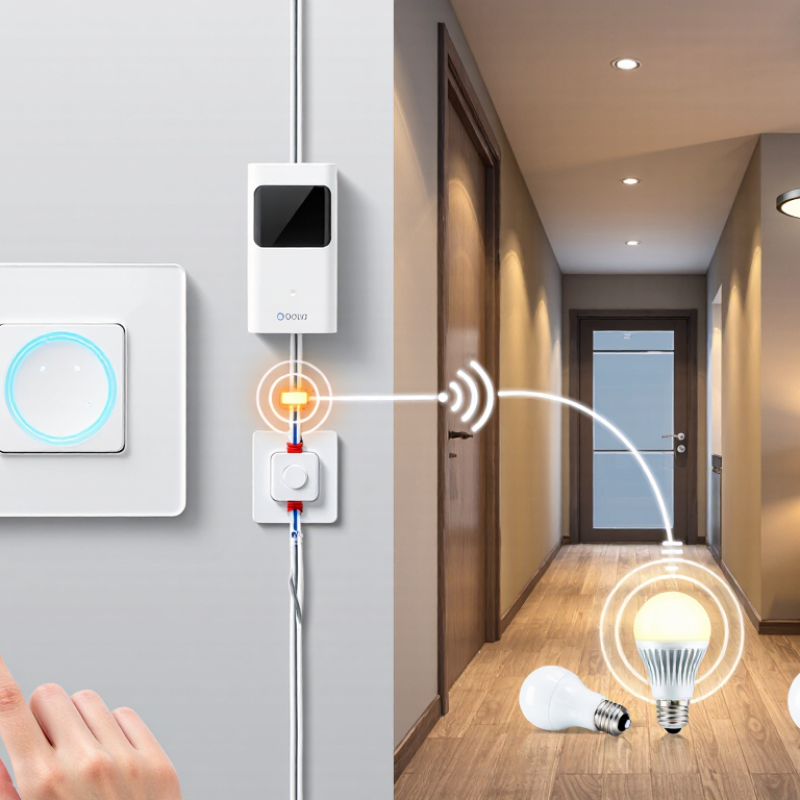
10 Best Smart Switches for Home Automation?

Smart Switches and Their Role in Home Automation

Smart switches connect everyday lighting to a home automation system, while keeping control at the wall. A tap can turn on a hallway light, and a schedule can switch off lamps after bedtime. With compatible sensors, lighting may respond when someone enters a room. These small changes can reduce repetitive tasks, but they do not make every routine easier.

Before installation, check the switch’s wiring requirements and the electrical load it supports. Some models need a neutral wire, which older homes may not have at every switch box. Dimming also depends on bulb compatibility; mismatched equipment can cause flickering or uneven brightness. Small details matter. A dependable setup should still allow manual control if the network is unavailable. Consider how the device handles account access and software updates, too. Automation can be useful, though a light that turns on at the wrong time quickly becomes annoying. It is worth testing schedules and sensor settings for several days, then adjusting them to match how the room is actually used.

How Smart Switches Connect to Home Networks and Devices

A smart switch is only useful when its network connection matches the home. Wi-Fi models connect directly to a router, while some switches use a low-power mesh protocol and need a separate hub. The difference matters in older homes with thick walls or crowded wireless networks. A switch near the kitchen may respond slowly if the router sits upstairs. Check the connection type and required hub before installation.

The switch also needs a way to communicate with other devices. A compatible home platform can link it to motion sensors, schedules, or voice controls. For example, a hallway light could turn on when a sensor detects movement after sunset. These routines depend on steady communication, not just a successful setup screen. Test the switch from its wall control and the app, then check whether automations still work when the internet briefly drops. Some features may stop working.

Wiring deserves equal attention. Many smart switches require a neutral wire, which older homes may not have in every wall box. Turn off power at the breaker and confirm the wiring before choosing a model; uncertain work calls for a qualified electrician. Network security counts, too. Use a strong router password, install available updates, and avoid placing the hub inside a closed metal cabinet. Small details, but easy to overlook.

Key Features for Comparing Smart Switches

When comparing smart switches, start with the wiring behind the wall plate. Some models require a neutral wire, which older homes may not have. Check the switch box before buying, and confirm the switch supports your lighting type and electrical load. A dimmer may flicker with incompatible bulbs. Annoying, but common.

Think about how the switch behaves when the internet drops. Does the wall control still work? Can schedules run locally, or do they depend on cloud access? These details matter during a router outage. Also compare connection options, such as Wi-Fi, Bluetooth, or a dedicated smart-home protocol. Your choice should fit the hub and devices you already use, not just the features listed on the box.

Physical controls deserve attention, too. A clear click, readable status light, and sensible button layout make daily use easier, especially in a dark hallway. Look for adjustable schedules, scene control, and reliable app updates. Consider privacy settings and whether account sharing is simple for household members. Installation instructions should be specific about wiring and safety; if the wiring is unclear, consult a qualified electrician. I would not choose on app screenshots alone. They can look polished while setup remains fiddly.

The 10 Best Smart Switches for Home Automation

The 10 best smart switches for home automation are not one-size-fits-all. A neutral-wire switch suits many newer homes, while a no-neutral model may help in older rooms; always confirm wiring before buying. A smart dimmer offers softer evening light, and a three-way switch can control one fixture from two locations. Check bulb compatibility, too. Some LEDs flicker.

For different routines,
consider a motion-sensing switch for a hallway, a scene switch for grouped lights, and an energy-monitoring switch for tracking use. A fan-control switch provides more useful speed adjustment than a basic on/off model. An outdoor-rated switch can manage suitable exterior lighting, while a compact smart button adds simple control where rewiring is inconvenient. The tenth useful option is a standard connected switch with dependable app and voice-assistant support.

Reliability matters more than a long feature list. Look for clear load ratings, secure installation instructions, and a control method that still works when Wi-Fi drops. In practice, placement can be awkward: a motion sensor may trigger from passing traffic, and app setup may take longer than expected. Hub requirements and wiring differ by model, so verify both before choosing.

How to Choose a Smart Switch for Your Home

Choosing a smart switch starts with the wiring, not the app. Remove the wall plate only if you know how to do so safely, and check whether a neutral wire is present. Some switch designs require one; others do not. If you are unsure, ask a qualified electrician rather than guessing. Check the wiring.

Next, match the switch to the lights and circuit. Dimmable LEDs may flicker with an incompatible dimmer, while fans often need controls designed for motors. If one light is operated from two locations, look for support for that setup. A product listing may say “multi-way,” but the wiring details still matter.

Consider how the switch behaves when the internet is down. Can someone turn on the hallway light with the physical paddle? Does the schedule run locally, or depend on a hub or cloud service? Think about the people who use the room, too: guests may expect a familiar button, not a phone app. Keep the wall control.

Before buying several, try one switch in a frequently used room. Notice whether it fits the wall box, responds reliably, and dims smoothly at low brightness. Compatibility charts can help, but they may not reflect every bulb combination. That part deserves a little skepticism.

10 Best Smart Switches for Home Automation? — How to Choose a Smart Switch for Your Home

This comparison covers common smart-switch types rather than specific products. Wiring, supported loads, connectivity, and features vary by model; check the device instructions and local electrical requirements before buying or installing.

Switch Type Best For Neutral Wire Typical Connectivity Key Considerations
1. Standard on/off smart switch Automating a single light circuit Usually required; confirm the specific model Wi-Fi, Thread, or a hub-based protocol, depending on model Controls compatible lights as a group. Check the switch’s load rating and whether its wiring matches the existing circuit.
2. Smart dimmer switch Adjustable brightness in living rooms, bedrooms, and dining areas Often required; some models are designed for installations without one Wi-Fi, Thread, or hub-based connectivity Use with dimmable bulbs and a compatible lighting load. Some LED bulbs may flicker or have a limited dimming range.
3. No-neutral smart switch Older homes or switch boxes without a neutral conductor No, if the model is specifically rated for no-neutral wiring Varies by model; may use Wi-Fi or a hub-based connection Compatibility can be more limited. Some models require a bypass at the light fixture, and certain LED loads may flicker or glow when off.
4. Three-way smart switch kit Lights controlled from two locations, such as stairs or hallways Depends on the switch and the wiring at each location Typically connects through Wi-Fi, Thread, or a compatible hub Choose a system designed for multi-location circuits. It may require a compatible companion switch, and wiring layouts differ between homes.
5. Smart switch with energy monitoring Tracking the electricity use of a switched lighting circuit Usually required; verify model requirements Often Wi-Fi or a hub-based protocol Monitoring reports the circuit’s measured use, not necessarily the consumption of each bulb. Check whether the feature is available in the app.
6. Smart fan-control switch Controlling a compatible ceiling fan from a Wall Switch Commonly required; check the wiring diagram Wi-Fi, Thread, or hub-based connectivity Use a fan-rated controller, not a light dimmer. Confirm motor compatibility and whether fan speed control or on/off control is supported.
7. Smart switch with motion sensing Hands-free lighting in utility rooms, hallways, or bathrooms Varies by model May connect directly over Wi-Fi or through a hub Check sensor range, field of view, and timeout settings. Placement and room layout affect detection; not every model is suitable for every location.
8. Matter-compatible smart switch Households seeking cross-platform smart-home compatibility Depends on the specific switch Matter over Wi-Fi or Thread; Thread devices need a compatible Thread border router Confirm the device type and features supported by the chosen smart-home platform. Matter compatibility does not guarantee every optional feature works everywhere.
9. In-wall smart relay module Keeping an existing wall switch while adding app or automation control Depends on the module and installation Wi-Fi, Thread, or a compatible hub-based protocol Must fit safely in the electrical box and match the circuit and load. Box depth, heat dissipation, and the module’s wiring instructions matter.
10. Outdoor-rated smart switch Automating exterior lights or other approved outdoor loads Varies by model Often Wi-Fi; some models use a hub-based connection Use only a device rated for its location and intended load. Follow enclosure, weather-protection, and local electrical-code requirements.

Article Source:

bottom of page